
The key points in brief
- How long does a projector lamp last? UHP lamps typically last 3,000–5,000 hours, often longer in eco mode; some modern models can achieve considerably more even in normal mode. Laser and LED light sources reach 20,000–30,000 hours and do without a conventional lamp change.
- When to replace it? When the picture as a whole becomes visibly darker or the projector displays a lamp warning – not solely based on the hour counter. Individual spots or pixel defects, on the other hand, usually have other causes.
- How to replace it? Let the device cool down, disconnect it from the mains, open the maintenance cover, pull out the lamp module by its handle, only touch the new lamp by its housing, and replace the filter at the same time. Time needed: 10–15 minutes.
Need a new lamp straight away? Go to projector replacement lamps – enter your projector model and find the right original or compatible lamp.
How long does a projector lamp last?
A conventional UHP lamp lasts an average of 3,000 to 5,000 operating hours. These are guide values – some modern models can achieve considerably more even in normal mode, and certainly in eco or power-saving mode (the lamp does not run at full power). Laser and LED projectors, on the other hand, reach 20,000 to 30,000 hours – there is no conventional lamp change.
| Light source | Typical lifetime | Maintenance |
|---|---|---|
| UHP lamp (conventional) | usually 3,000–5,000 h (more for some models) | lamp change required |
| LED | 20,000–30,000 h | maintenance-free |
| Laser | 20,000–30,000 h | maintenance-free |
How should manufacturers' hour figures be understood?
Lamp life figures are manufacturer-specific guide values, not a guarantee – there is no uniform measurement standard. Reputable manufacturers measure them like this: several devices from a series run in the test lab until the lamp reaches around 60 % of its initial luminosity. This point counts as the end of the stated lifetime – separately for normal and eco mode. The figure is therefore a realistic average, not a guaranteed value.
Is the stated number of hours reliable?
As a rule, yes – modern projectors usually achieve the stated lifetime. How long the lamp really lasts, however, depends heavily on dust, cooling and usage. If you operate the projector according to the instructions, you can often get several thousand hours more out of it (see the care tips below).
How can I tell that the lamp needs replacing?
The remaining lamp hours can be read in the projector's settings – but this is only a guide value based on factory specifications. These signs are more reliable:
- The picture becomes noticeably darker
- Contrast becomes blurred
- Colour casts in the picture
- Lamp or filter warning from the projector
If the whole picture evenly becomes darker or develops a colour cast, this points to an aged lamp. Individual spots, discoloured areas or pixel defects, on the other hand, are more likely to indicate the panel, DLP chip or dust in the light path – a lamp change will not help here. As long as the projector is technically sound, a new lamp restores the picture for a fraction of the cost of a new device.
Replacing the projector lamp: step by step
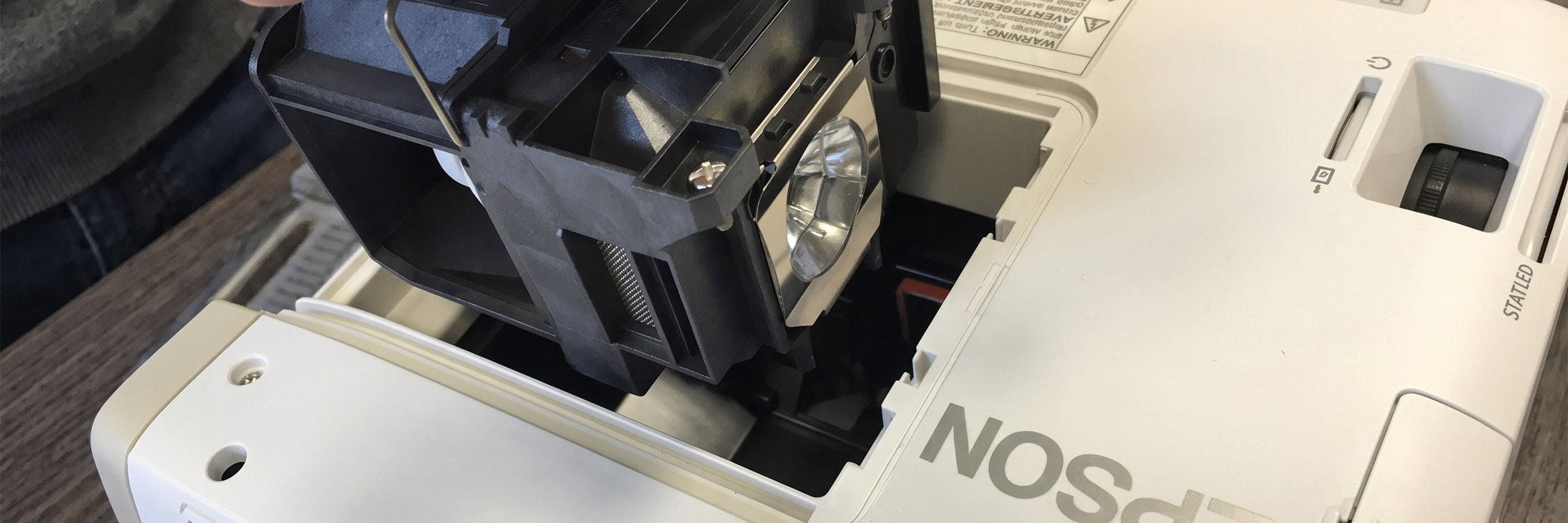
With a little care, the change takes 10–15 minutes. An Epson EH-TW6600W serves as an example – the principle is the same for most projectors; the exact position of the maintenance cover is given in your operating instructions.
With most projectors, you replace a complete lamp module – the lamp sits in a housing with a holder. This makes the change easier and safer than handling a bare lamp on its own.
What you need:
- A Phillips screwdriver
- Two towels or a blanket (as a base)
- The right replacement lamp
- Optional but recommended: a replacement air filter
Safety & disposal: Let the projector cool down completely and unplug it before you start – the lamp gets very hot during operation. If the old lamp is broken, do not vacuum the lamp compartment, but clean it carefully according to the manufacturer's instructions. Old UHP lamps contain mercury and must not be put in household waste – take them to a recycling centre or a specialist retailer for disposal.
Good to know: As mercury-containing lamps are increasingly regulated in the EU, LED and laser projectors are becoming ever more important. For existing projectors, however, replacing the lamp often remains the most sensible solution as long as the device is still in good technical condition.
Preparation (steps 1–2)
Step 1 – Disconnect the power and let it cool down. Switch off the projector properly, unplug it and remove the battery if there is one. If the device has just been in use, be sure to let it cool down – the projector must not be hot when you change the lamp.


Step 2 – Prepare your workspace. A kitchen or living room table is sufficient. Place a folded towel or blanket under the projector to avoid scratches when turning and tilting it.
Removal (steps 3–4)
Step 3 – Open the maintenance cover. Turn the projector so that you can easily reach the maintenance cover. Loosen the screws and put the cover aside. If there is an air filter nearby, take it out to replace it.


Step 4 – Remove the lamp module. The lamp is secured with screws or clips – undo them. Carefully pull the lamp module out of its guide by the handle provided. Important: Only ever touch the new lamp by its housing, never by the glass itself – skin oil can damage the lamp.


Installation (steps 5–6)
Step 5 – Insert the new lamp. Take the replacement lamp out of its packaging, place it on the guide in the lamp compartment in the correct orientation and carefully push it in.


Step 6 – Secure and close. Secure the lamp again with the screws or clips you removed earlier. Insert the (fresh) air filter, close the maintenance cover and screw it tight.

Put the projector back in its place and connect it to the mains. After switching on, the lamp should work straight away.
Replace the air filter at the same time
On many projectors, the air filter sits behind a separate cover. Ideally, replace it with a fresh replacement filter when you change the lamp – this ensures better cooling and the new lamp lasts longer. Ideally, order the right filter together with the replacement lamp.


Resetting the lamp hours
Many projectors keep a lamp hour counter that controls the maintenance warning. Reset it in the menu after the change (usually under "Information" or "Reset") – otherwise the projector will keep reporting that a lamp is due. The exact menu path is given in the manual for your model.
Extending lamp life: 3 care tips
- Wait for the fan to finish running. After switching off, only disconnect the projector from the mains once the fan has stopped by itself – this allows the hot lamp to cool down in a controlled way. Many devices control this run-on automatically.
- Keep the filter clean. A dusty filter restricts the air supply and makes the lamp run hotter. Replace it regularly with a fresh replacement filter.
- Use eco mode. Where full brightness is not needed, eco mode extends lamp life considerably – less power means less heat.
Frequently asked questions about changing the lamp
Am I entitled to a replacement if the lamp fails prematurely?
A lamp is a wearing part – there is no general entitlement. Warranty terms vary by manufacturer and model and are often linked to a period of time or operating hours (frequently around 90 days or 500 hours). Keep your invoice and the lamp hour reading and have an early failure checked.
How do I reset the lamp hours?
In the projector menu under "Information", "Reset" or "Lamp" there is a function for resetting the counter to zero. Only do this after installing the new lamp. The manual for your model gives the exact menu path.
Is it worth replacing the lamp, or is a new projector better?
As long as the projector is technically sound, replacing the lamp is almost always cheaper. If, on the other hand, the device is very old or the lamp costs almost as much as an entry-level model, it is worth switching to a maintenance-free laser or LED projector. Note: permanent spots, discolouration or pixel defects in the picture do not point to the lamp but to a defective panel or chip – in that case a lamp change will not help, and a new projector is usually the more economical choice.
Why do LED and laser projectors last so much longer?
They produce light without a conventional gas discharge lamp and therefore with less thermal stress. As a result, they reach 20,000–30,000 hours – beyond the typical service life, without a conventional lamp change.
The new lamp does not start – what should I do?
Check that the lamp module has clicked fully into place and that the maintenance cover is closed properly – otherwise many projectors will not start for safety reasons. Also check whether the lamp hour counter has been reset.
Finding the right replacement lamp
Need a new projector lamp? In our category projector replacement lamps you will find original and compatible lamps for almost all manufacturers – simply enter your projector model in the search. The exact model name is usually on the underside or back of the projector, or in its menu.
Not sure which lamp fits? Tell us the manufacturer and model name of your projector – we will check whether you need an original module, a compatible lamp or an air filter as well, and whether original or compatible is the better choice:
- Phone: 0221 - 719981 - 0
- Email: vertrieb@beamer-discount.de
- Personal advice: straight to a specialist adviser
Matching product categories in the shop:
Further guides:
- Projectors for pubs and restaurants – brightness and features for the hospitality sector
- Projector lamps – light sources and returning your lamp
- Projector or TV? Comparison & when it pays off 2026 – a comparison and when a projector is worth it
