

 | SKU:
1000033306
celexon HomeCinema Wireless Trigger FT1
- 24 months Warranty
- 0.1 kg Weight
PayPal Klarna credit card invoice
Questions about the product?
Whether it's a conference room, school or home cinema – Detlev Kohlmann, our Projectors and screens specialist, will advise you personally and prepare an individual quote for you.
Conference room, school or home cinema: we give you personal advice and put together a tailored quote.
Detlev KohlmannProjectors and screensspecialist

 | SKU:
1000033306
Description
celexon HomeCinema Wireless Trigger FT1

- Trigger KitProduct type
- BlackColour
With the celexon HomeCinema Wireless Trigger FT1, you can control your celexon motorized screen without transmission or reception interference, even through masonry.
Annoying interference with, for example, existing IR devices is a thing of the past. Furthermore, wireless systems do not require a direct line of sight between the transmitter and receiver. This makes the system particularly suitable for concealed installation.
The celexon wireless trigger offers the ideal solution for reliably making any projector trigger-compatible! Unlike wired solutions, a trigger-out (3.5 mm jack) on the projector is not essential. USB triggers can also sometimes fail to work with projector USB ports, as these ports are not always directly switched off by the projector.
celexon's solution bypasses this problem with this smart wireless trigger. Simply connect it to your projector's power cable, pair it, and your projector can always reliably and intelligently automate your screen - without the hassle of running cables!
This allows your screen to lower automatically when you switch on your projector and retract automatically as soon as the projector is switched off.
Operation and compatibility of the celexon HomeCinema Wireless Trigger FT1:
To use the wireless trigger, you must have a screen from one of the following series; otherwise, this trigger cannot be used with any other screen series:
- celexon UST High Contrast Floor-Mounted Scissor Screen - HomeCinema Plus
- celexon CLR UST High Contrast Floor-Mounted Scissor Screen - HomeCinema V2.0
- celexon HomeCinema Plus Tension Motorized Screen - CLR UST
- celexon Electric Laser TV Retractable Screen
The trigger is plugged into the power input on your projector, and then your projector's power cable is plugged into the trigger. This completes the technical connection.
Your projector must have an "IEC cold appliance connection" (IEC-C14), which is the case with almost all devices.
Alternatively, simple adapter solutions are available from retailers if your projector has a "Mickey Mouse connection" (IEC-C6) or "small appliance connection" (IEC-C8).
C14 connection: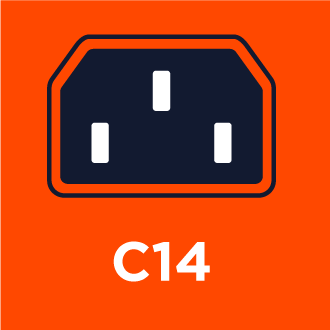
C6 connection:
C8 connection:
The celexon wireless trigger is then paired with the respective power consumption when your projector is switched on, allowing it to detect the difference between the ON/OFF states of your projector and reliably control the screen wirelessly accordingly.
Due to the partially different installation methods required by the design of the motors in the screen or retractable screen, the direction of motor rotation may vary. Therefore, the wireless trigger may need to be adjusted to control the screen or retractable screen in the correct direction. To do this, simply press and hold the "Learning Button" on the wireless trigger for 5 seconds until the red LED flashes briefly several times. The trigger can then be adapted to the respective direction of rotation.
PACKAGE CONTENTS
1x celexon HomeCinema Wireless Trigger FT1
Technical data
-
General
-
Condition
-
Manufacturer
-
Brand
-
Model name
-
Manufacturer part number
-
EAN
-
Product type
-
Product series
-
-
Dimensions and weight
-
Weight
-
Colour
-
-
Scope of delivery and warranty
-
Warranty
-
Warranty type
-
WEEE number
-
Documents & downloads
Reviews
Product safety information
Manufacturer
celexon
EU responsible person
celexon Europe GmbHGutenbergstraße 2
48282 Emsdetten
Germany
Contact
E-Mail: info@celexon.de

