


 | SKU:
1000037930
Samsung Flip WM85FX 85" interactive 4K UHD touch display with IR touch, Tizen 9.0
- 85 inches (215 cm), 450 cd/m² Display
- 3840 x 2160 4K UHD Resolution · 16:9
- 20-point IR touch Touch
- 26 ms Touch
- 4-way simultaneous drawing Touch
- 2x HDMI In, USB-C (integrated), AirPlay 2, Miracast, SmartView+ Connections
- OPS slot Features
- Samsung Knox Features
- VESA 600x400 Features
- 3-year warranty Features
- 40 W 4-channel audio Sound
Customers almost always keep this item
This item is very rarely returned after purchase – based on orders from the last 24 months.
Matching accessories
Samsung Flip WM85FX is always included 3.199,00 €
Together
Tax included
The items have different delivery times and will arrive in several shipments.
Questions about the product?
Whether it's a conference room, school or home cinema – Dannie Tsegai Tesfai, our Projectors and displays specialist, will advise you personally and prepare an individual quote for you.
Conference room, school or home cinema: we give you personal advice and put together a tailored quote.
Dannie Tsegai TesfaiProjectors and displaysspecialist

 | SKU:
1000037930
Customers almost always keep this item
This item is very rarely returned after purchase – based on orders from the last 24 months.
Description
Samsung Flip WM85FX


- 4,000:1Contrast
- 6.7Response time
- 4K UHDResolution · 3840 × 2160
- 450Brightness
Samsung Flip WM85FX – the large-format interactive 4K touch display for conference rooms and schools
The Samsung Flip WM85FX turns large conference and training rooms into interactive work zones: four people can draw on the 85" board at the same time, 40 W 4-channel audio fills the room without external speakers, and the OPS slot does away with an additional PC at the display. 20-point multi-touch, the Samsung NoteOn whiteboard app, Microsoft 365 and wireless standards such as AirPlay 2, Miracast and SmartView+ make the WM85FX the central communication platform in large conference rooms, training rooms and auditoriums.
All connections are built in – no optional accessories needed: 2x HDMI In, 1x USB-C (3-in-1 for video, audio and touch), 2x USB-A and 1x HDMI Out are available directly on the device. For video conferencing, a laptop or PC is needed as the signal source – a single USB-C cable handles picture, touch and charging. The advantage: you work with your usual conferencing tools, calendar entries and login details, while the Flip serves as a large touch display with whiteboard function. An external camera and microphone – e.g. the Yealink A40 MeetingBar – turn the room into a complete conferencing solution. The integrated OPS slot accepts PC modules that fully replace the laptop. Samsung Knox protects the device with encrypted storage, Secure Boot and protection against unauthorised firmware changes.
Key benefits at a glance
- 4-way simultaneous drawing – up to 4 people can work on the display at the same time, ideal for workshops and brainstorming
- Wireless collaboration – AirPlay 2, Miracast and SmartView+ for up to 9 devices at the same time, without adapters or software installation
- Tizen 9.0 with integrated browser – Microsoft 365, web research and NoteOn directly on the display, without an external PC
- Samsung Knox Security – encrypted storage, Secure Boot and protection against unauthorised firmware changes
- 40 W 4-channel audio – four integrated speakers for clear sound in large rooms, even without an external PA system
- 3-year warranty with on-site service – extendable to up to 5 years, incl. on-site repair
Touch and interaction
The WM85FX uses infrared touch technology with 20 simultaneous touch points. Touch latency is just 26 ms and the touch overlay responds in 6.7 ms – fast enough for smooth writing and drawing. Up to 4 people can draw on the display at the same time, making the WM85FX ideal for workshops and brainstorming sessions.
Two passive pens with magnetic holders are included in the box. The pens need no battery and attach magnetically to the display frame – always within reach. The integrated Samsung NoteOn whiteboard app allows freehand drawings, text notes and annotations directly on any source – whether HDMI signal, website or presentation.
Collaboration and connectivity
The WM85FX supports three wireless transmission standards: Apple AirPlay 2 for iOS and macOS, Miracast for Windows and Android, and Samsung SmartView+. Up to 9 devices can share their screen at the same time – ideal for meetings with mixed devices.
For wired connections, 2x HDMI input, 1x HDMI output and 1x USB-C (3-in-1 for video, audio and touch with 15 W Power Delivery) are available directly on the device – no connectivity tray needed. The USB-C port transmits the video signal and charges the connected notebook at the same time – one cable is all it takes. The HDMI output lets you pass the image on to a second monitor.
The connections are distributed between the front and back: at the front, 1x HDMI In, 1x USB-A and 1x Touch Out are accessible – ideal for quickly connecting a laptop in a meeting. The main connections (second HDMI In, HDMI Out, USB-C, second USB-A, USB-B upstream) are on the back.
LAN (RJ-45) and Wi-Fi (802.11ac) are available for network connection. Bluetooth 5.0 is available for connecting audio devices such as soundbars or headphones. The RS-232 interface enables integration into professional media control systems.
Display quality
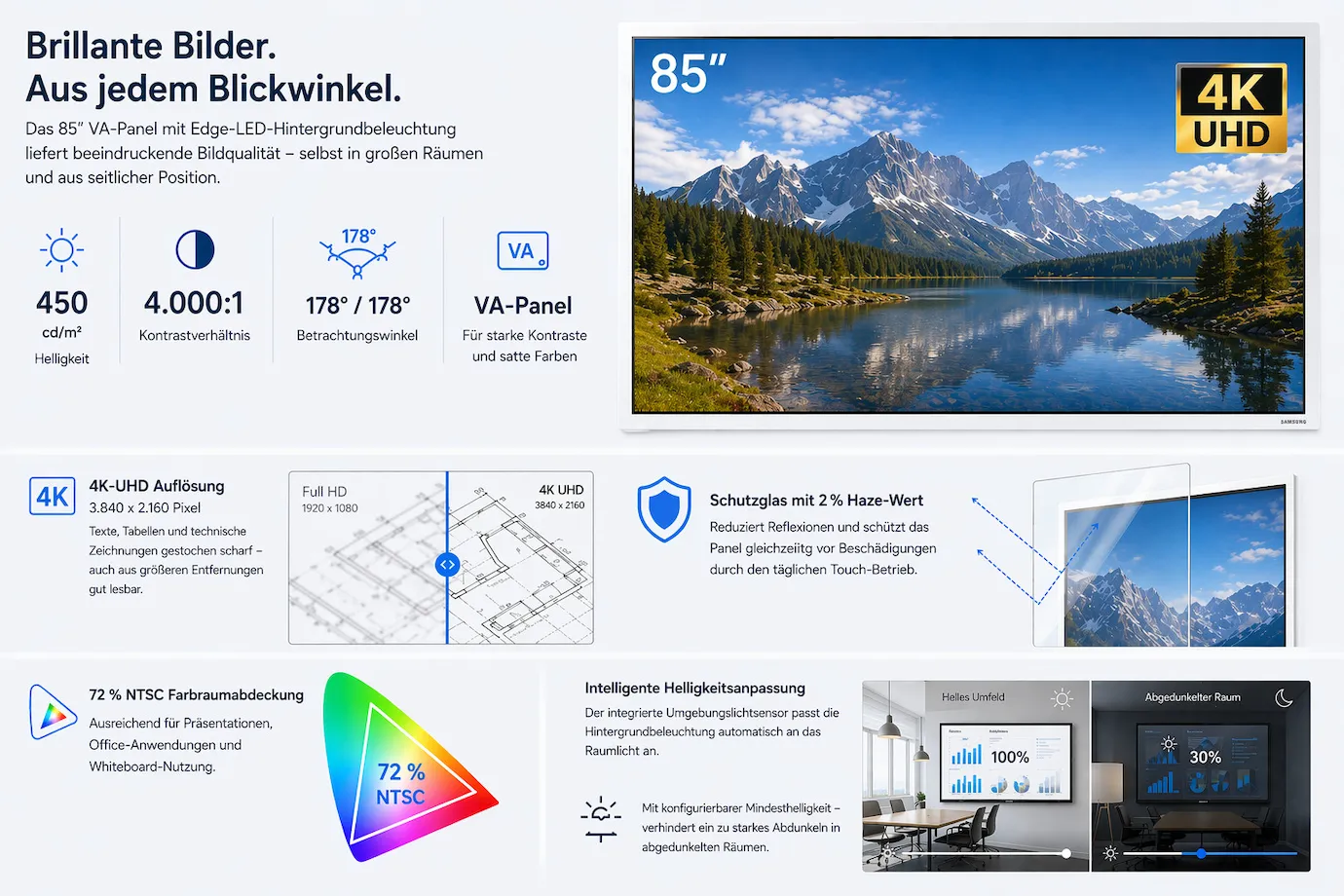
The 85" VA panel with edge LED backlighting delivers 450 cd/m² brightness and a contrast ratio of 4,000:1. With a viewing angle of 178°/178°, the image remains high-contrast and colour-stable even from the side – important for larger meeting groups and rows of seating.
The native 4K UHD resolution (3,840 x 2,160 pixels) renders text, tables and technical drawings razor-sharp – easy to read even from greater distances. The protective glass with a 2 % haze value reduces reflections while protecting the panel from damage caused by daily touch use. The colour gamut covers 72 % of the NTSC standard – sufficient for presentations, office applications and whiteboard use.
The integrated ambient light sensor automatically adjusts the backlight to the room lighting. A configurable minimum brightness prevents the display from dimming too much in darkened rooms – for example during a presentation.
Software and management
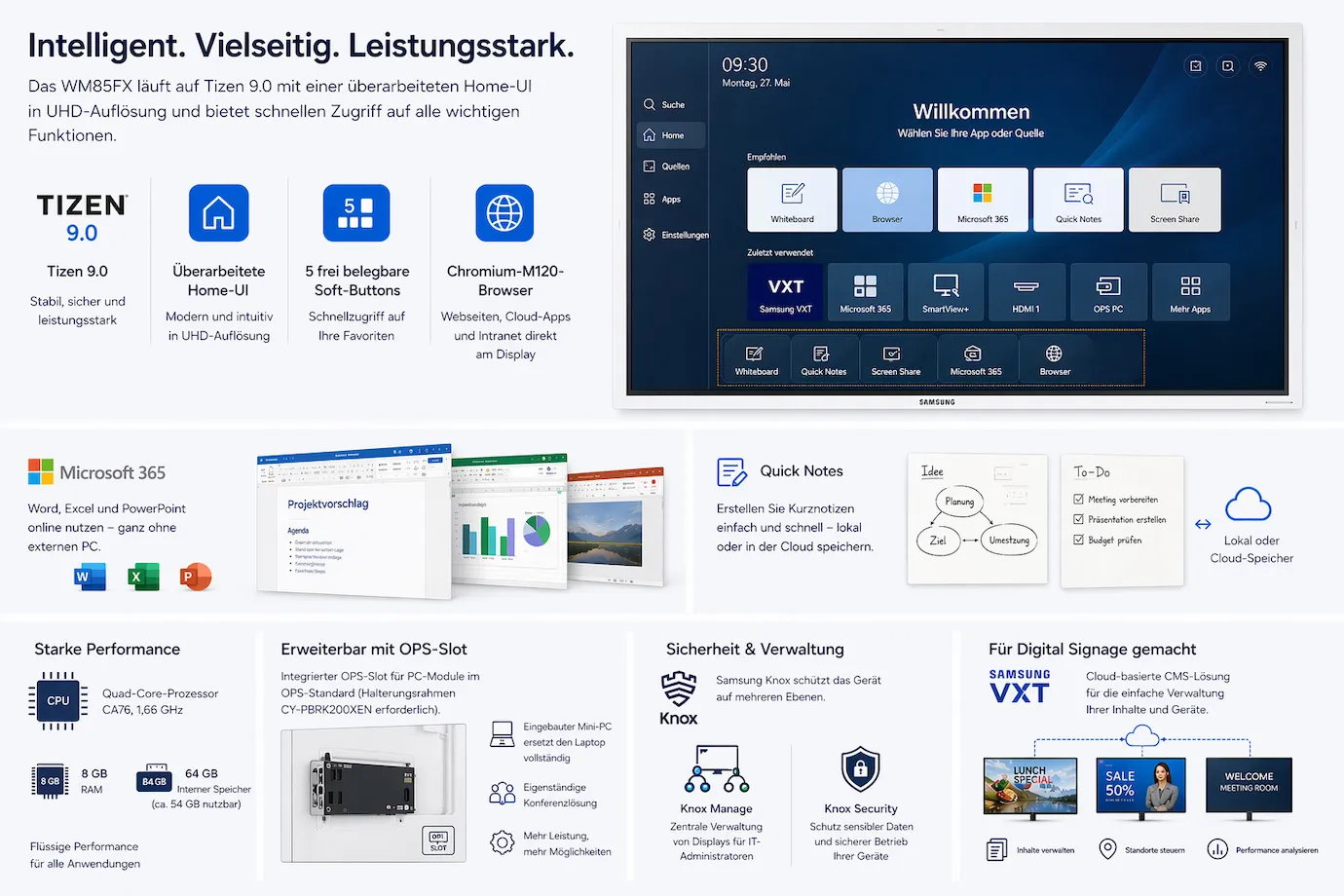
The WM85FX runs on Tizen 9.0 with a redesigned home UI in UHD resolution. Five freely assignable soft buttons provide quick access to frequently used functions. The integrated Chromium M120 browser opens websites, cloud applications and intranet portals directly on the display.
Microsoft 365 is available as an online service – Word, Excel and PowerPoint can be opened and edited without an external PC. With the Quick Notes function, you create short notes that are saved locally or in the cloud.
The quad-core processor (CA76, 1.66 GHz) with 8 GB RAM and 64 GB internal storage (approx. 54 GB usable) ensures smooth performance. The integrated OPS slot allows a PC module to the OPS standard to be installed (optional mounting frame CY-PBRK200XEN required) – a built-in mini PC completely replaces the laptop and creates a standalone conferencing solution. Samsung Knox protects the device and enables central management via Knox Manage. For digital signage scenarios, Samsung VXT provides a cloud-based CMS solution.
Set-up and mounting
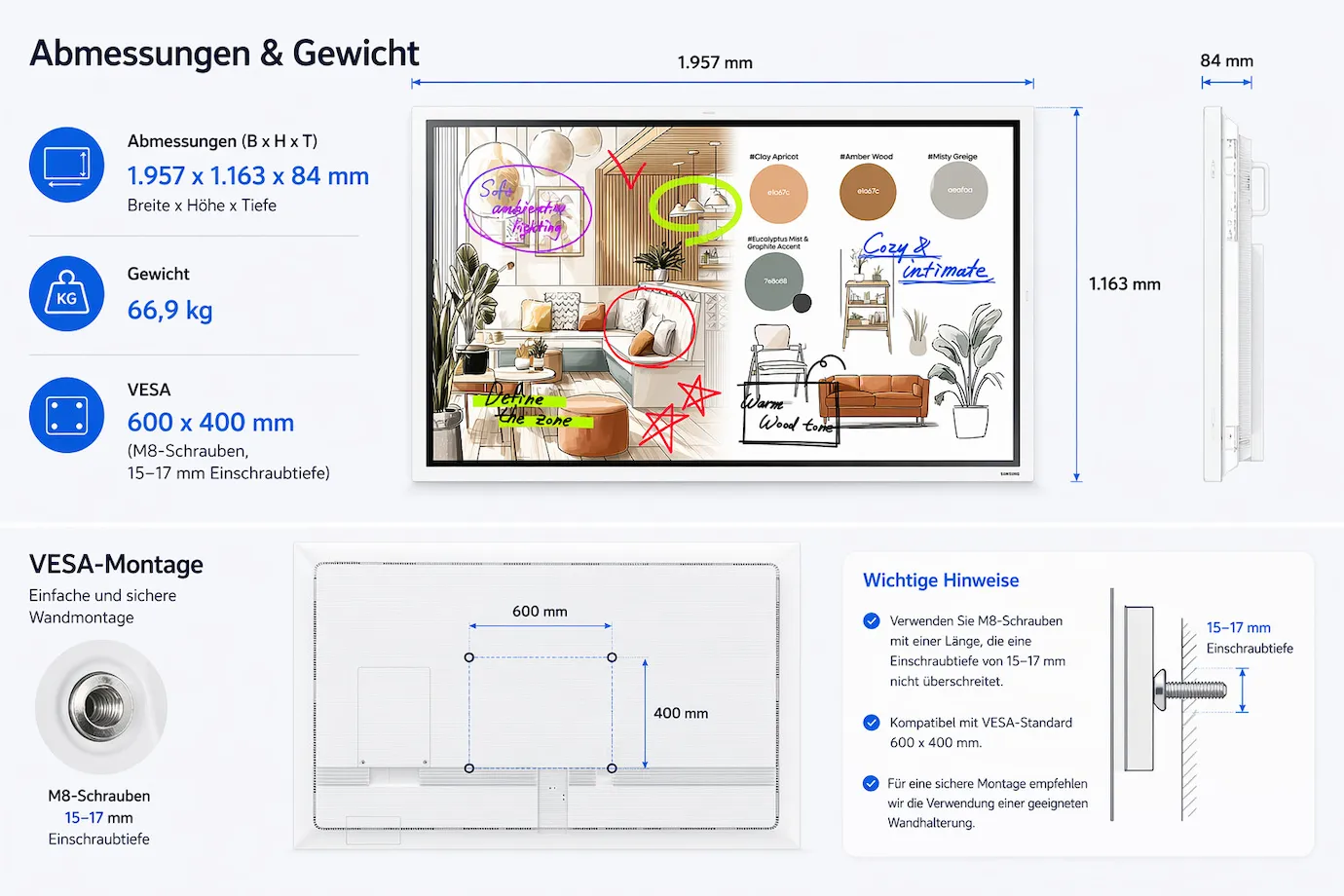
- Dimensions: 1,957 x 1,163 x 84 mm (W x H x D)
- Weight: 66.9 kg
- VESA: 600 x 400 mm (M8 screws, 15–17 mm screw depth)
Note on the VESA pattern: The WM85FX uses a 600 x 400 mm VESA pattern – unlike the smaller models (400 x 400 mm). Please bear this in mind when choosing a wall mount.
For mobile use, we recommend the electrically height-adjustable celexon Oslo Max. Alternatively, the celexon Seoul is available for all Samsung Flip sizes. For fixed wall mounting, the celexon Display Wall Mount Fixed-10035 is ideal.
The display is designed for 12/7 operation – 12 hours a day, 7 days a week. Power consumption is 198 W in operation and just 0.5 W in standby. Example calculation: with 10 hours of use on 250 working days, annual energy consumption is approx. 495 kWh in operation plus approx. 3 kWh in standby – around 498 kWh per year in total.
Ideal for
- Large conference rooms and boardrooms: 85" for groups of up to 25 people, fully integrated connections, 40 W audio without external sound reinforcement, wireless screen sharing for mixed device environments
- Schools and educational institutions: 20-point touch for interactive teaching content, NoteOn for annotations on any source, durable 3-year warranty with on-site service
- Auditoriums and seminar rooms: Maximum viewing area, high legibility from a greater distance, OPS slot for standalone operation
- Digital signage and info displays: Tizen-based playlists and Samsung VXT for centrally controlled content without an external player
Samsung Flip compared – which model suits you?
All four models in the Samsung Flip WM-FX series share the same 4K UHD resolution, IR touch technology and Tizen 9.0 platform. The main differences lie in screen size, speaker configuration, connection layout and pivot capability:
| Feature | WM55FX | WM65FX | WM75FX | WM85FX |
|---|---|---|---|---|
| Screen diagonal | 55" (139 cm) | 65" (164 cm) | 75" (189 cm) | 85" (215 cm) |
| Speakers | 15 W x 2 | 15 W x 2 | 10 W x 4 | 10 W x 4 |
| Total audio output | 30 W | 30 W | 40 W | 40 W |
| Pivot (portrait/landscape) | Yes | Yes | No | No |
| Front connections | – (opt. connection box) | – (opt. connection box) | 1x HDMI In, 1x USB-A, 1x Touch Out | 1x HDMI In, 1x USB-A, 1x Touch Out |
| Rear connections | 1x HDMI In, 1x HDMI Out, 1x USB-A, 1x Touch Out | 1x HDMI In, 1x HDMI Out, 1x USB-A, 1x Touch Out | 1x HDMI In, 1x HDMI Out, 1x USB-C, 1x USB-A, 1x USB-B, 1x Touch Out | 1x HDMI In, 1x HDMI Out, 1x USB-C, 1x USB-A, 1x USB-B, 1x Touch Out |
| OPS slot | No | No | Yes | Yes |
| VESA pattern | 400 x 400 | 400 x 400 | 400 x 400 | 600 x 400 |
| Weight | 28.6 kg | 39.7 kg | 53.6 kg | 66.9 kg |
| Power consumption | 98 W | 120 W | 178 W | 198 W |
| Ambient light sensor | No | No | Yes | Yes |
55" and 65": Compact, with pivot function and optional Connectivity Tray – ideal for small meeting rooms and mobile use. 75" and 85": All connections (incl. USB-C) permanently integrated, OPS slot for PC modules and higher total audio output (40 W) – for larger conference and training rooms.
Have you thought of everything?
- USB-C cable – For a direct connection between notebook and display (video + touch + charging in one cable). InLine USB-C cable
- HDMI cable – for connecting external sources directly. celexon HDMI cable 4K
- Replacement pens – two passive touch pens are included in the box. Samsung Flip replacement pens (pack of 5)
- Trolley for mobile use – celexon Seoul or celexon Oslo Max (electrically height-adjustable)
- Wall mount – celexon display wall mount Fixed-10035 – note VESA 600 x 400 mm!
- OPS PC module – an external mini PC can be installed via the integrated OPS slot (OPS mounting frame CY-PBRK200XEN). Do you need advice on the right OPS module? Our advisory team will be happy to help.
- Wireless presentation – Kindermann Klick&Show K-FX for wireless BYOD presentations
- Digital signage with Samsung VXT – cloud-based content management for playlists, schedules and central control of multiple displays. Samsung VXT annual licence in our shop. Are you planning several displays or combined use as a meeting room board and info display? Our advisory team will help you with the planning.
- Video conferencing equipment – The Flip has no built-in camera or microphone. The Yealink A40 MeetingBar provides both in one device. A connected laptop, PC or OPS module is required for the conferencing software.
Conclusion
The Samsung Flip WM85FX is the most powerful model in the series – 85" 4K touch, fully integrated connectivity including USB-C and 40 W 4-channel audio. The OPS slot allows a mini PC to be installed for fully standalone operation. Note the VESA pattern of 600 x 400 mm when wall mounting. Wireless standards such as AirPlay 2 and Miracast and the integrated Chromium browser make a separate PC unnecessary in many scenarios.
Would you like to see the Samsung Flip WM85FX in action or do you need a solution for several rooms? Contact our advisory team – we will plan your complete solution including wall mount (VESA 600x400), OPS module and video conferencing integration.
Technical data
-
General
-
Condition
-
Manufacturer
-
Brand
-
Model name
-
Manufacturer part number
-
EAN
-
Product type
-
Product series
-
FeaturesIntegrated speaker, Touchscreen
-
-
Image
-
Technology
-
Panel technology
-
Diagonal
-
Resolution
-
Aspect ratio
-
Brightness
-
Contrast ratio
-
Backlight
-
Response time
-
Refresh rate
-
Viewing angle horizontal
-
Viewing angle vertical
-
Operating hours rating
-
-
Screen and whiteboard
-
Frame width
-
-
Connections and wireless
-
Inputs1x Ethernet, 1x RS232, 2x HDMI, 2x USB-A
-
Outputs1x 3.5 mm jack
-
Wireless technologyBluetooth, Wi-Fi
-
-
System and smart features
-
Operating system
-
Memory (RAM)
-
-
Mounting and furniture
-
VESA standard600 x 400
-
-
Energy and noise
-
Energy label range
-
-
Dimensions and weight
-
Dimensions (W × H × D)195.7 × 116.2 × 8.3 cm
-
Weight
-
Colour
-
-
Scope of delivery and warranty
-
Scope of delivery2x pen, Power cable, Quick start guide, USB cable, Warranty card
-
Warranty
-
Warranty type
-
WEEE number
-
Documents & downloads
Reviews
Product safety information
Manufacturer
Samsung
EU responsible person
Samsung Electronics GmbHFrankfurter Straße 2
65760 Eschborn
Germany
Contact
E-Mail: info@samsung.de

