


 | SKU:
1000036336
Biamp Systems EasyConnect MPX 250 EXT 30
- 36 months Warranty
- 1.7 kg Weight
PayPal Klarna credit card invoice
Questions about the product?
Whether it's a conference room, school or home cinema – Michael Narang, our Audio and project planning specialist, will advise you personally and prepare an individual quote for you.
Conference room, school or home cinema: we give you personal advice and put together a tailored quote.
Michael NarangAudio and project planningspecialist

 | SKU:
1000036336
Description
Biamp Systems EasyConnect MPX 250 EXT 30


- BlackColour
Extension for Your Conference System: EasyConnect MPX 250 EXT 30
Are you planning your conference or huddle room setup and running into cable length limitations? With the EasyConnect MPX 250 EXT 30, those worries are a thing of the past. This extension system was specially developed for businesses and integrators who want to create flexible and powerful meeting rooms. It extends the connectivity of your EasyConnect MPX 250 base system over a distance of up to 10 meters and ensures a seamless connection between the conference table and the display.
Product Highlights and Features:
- Flexible Room Design: The system extends the connectivity of your MPX 250 by up to 10 meters, allowing you maximum freedom when placing displays and conference tables in larger rooms.
- Discreet Installation: The compact and flat design of the MPX 250 EXT allows for inconspicuous mounting behind the display, so your meeting room maintains a clean and professional appearance.
- Robust & Durable Cables: The EasyConnect MPX 250 Link cable is reinforced with Kevlar and withstands a tensile force of 200N, ensuring a secure and hassle-free installation and guaranteeing the longevity of the connection.
- Easy Handling: Thanks to the detachable electronics at the cable end, installation in the wall is simplified and installation effort is minimized. The integrated steel cable mount allows for effortless routing.
Detailed Application Options for the EasyConnect MPX 250
The EasyConnect MPX 250 can be flexibly adapted to various room sizes and configurations. The EasyConnect MPX 250 expands this flexibility by enabling connectivity with multiple units. Here you will find an overview of typical application scenarios and how you can implement them with your EasyConnect MPX 250.
Connectivity Fundamentals
To understand the installation, it is helpful to know the basic terms:
- Upstream and Downstream: Upstream connections go towards the user devices (such as laptops), while downstream connections lead to the room devices (displays, cameras, microphones).
- USB Daisy Chain Limitation: The USB specification allows a maximum of 5 hubs in a chain between the host (laptop) and the end device (peripheral). The architecture of the EasyConnect MPX 250 was designed to ensure that this rule is always followed, ensuring optimal performance and stability.
Simple Configurations
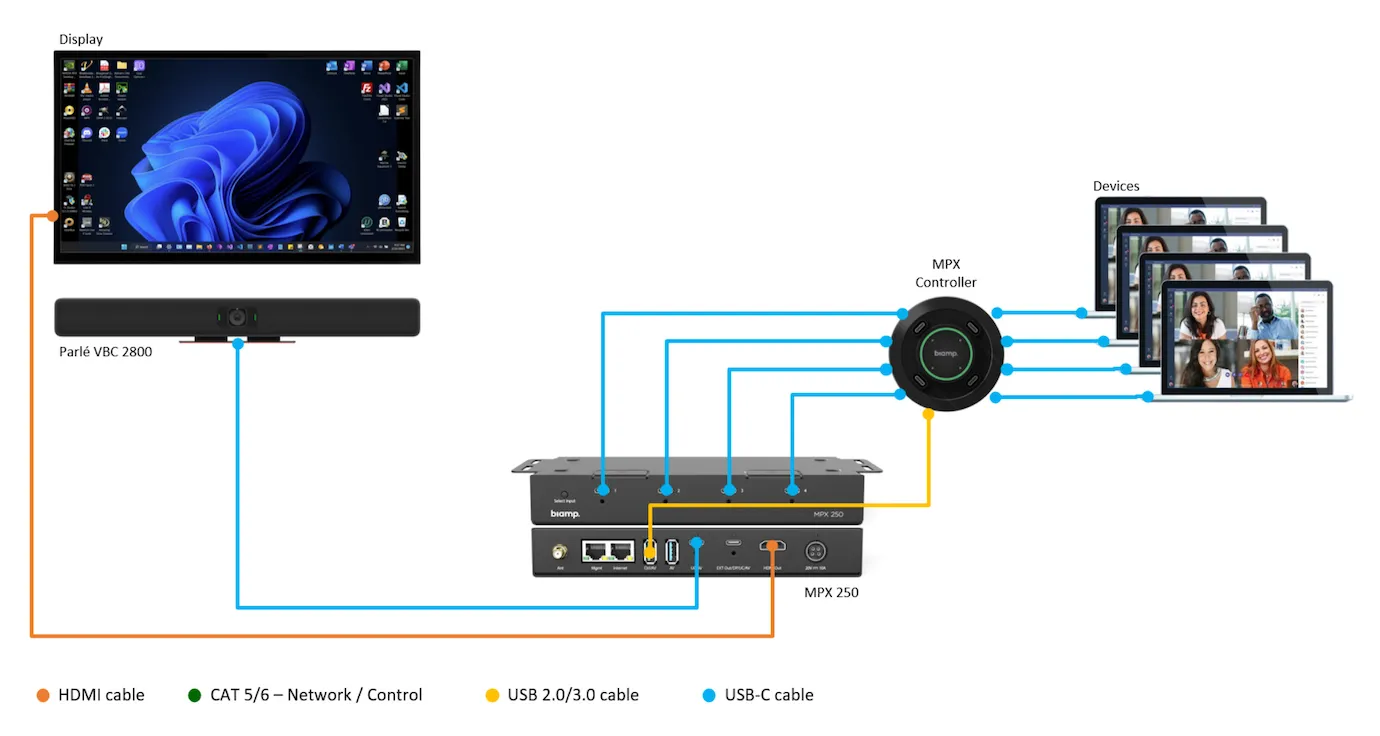
Single Unit, One Display
This is the most basic setup. A single EasyConnect MPX 250 is connected to the room display via HDMI and to the conference peripherals (e.g., camera, microphone) via USB. This creates a central hub for media connectivity in smaller meeting rooms.
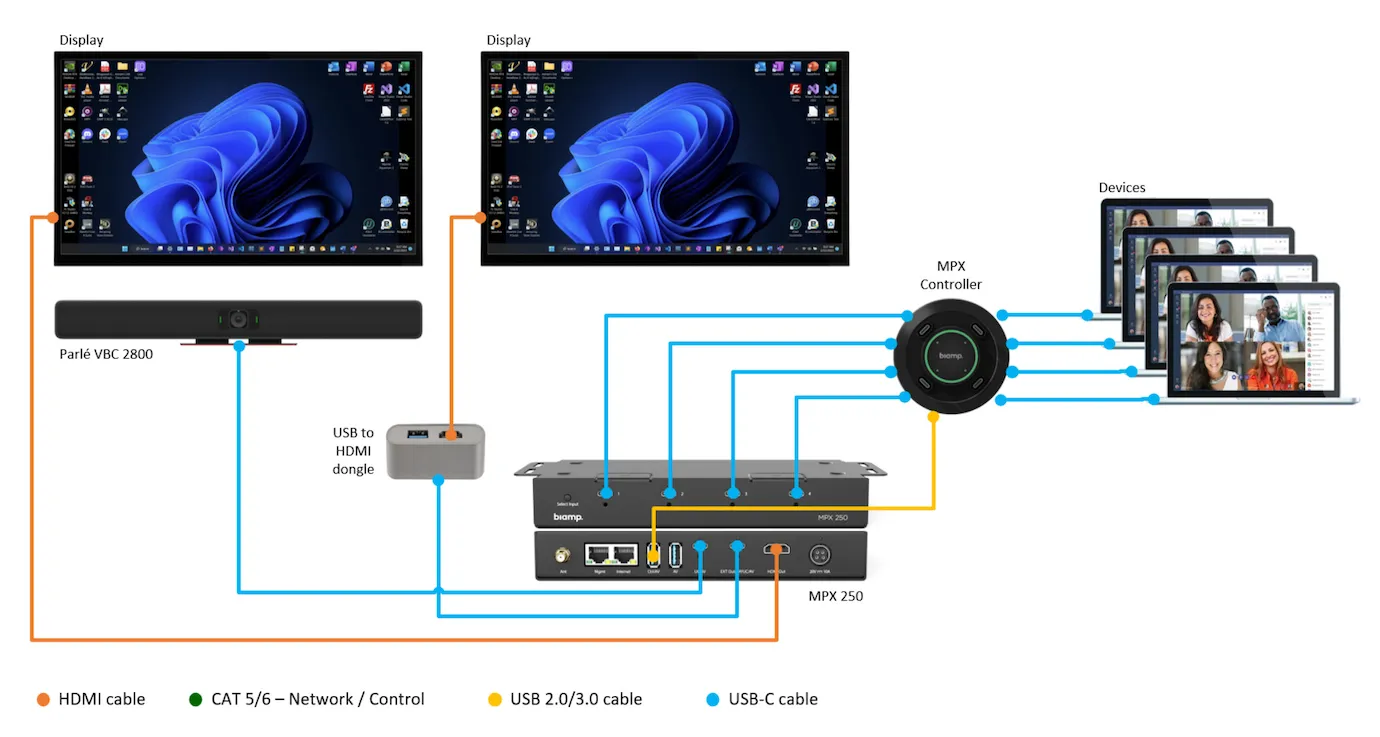
Single Unit, Two Displays
For medium-sized conference rooms or seminar rooms with two displays, you can connect a second display via the EXT Out/DP/UC/AV USB-C port. For displays that only have HDMI, you simply need a USB-C to HDMI adapter to convert the video signal.
Scalable Systems with Multiple Units
This is where the strength of the EasyConnect MPX 250 really comes into play. It allows you to seamlessly connect multiple MPX 250 units in a single system, massively increasing the number of connection options.
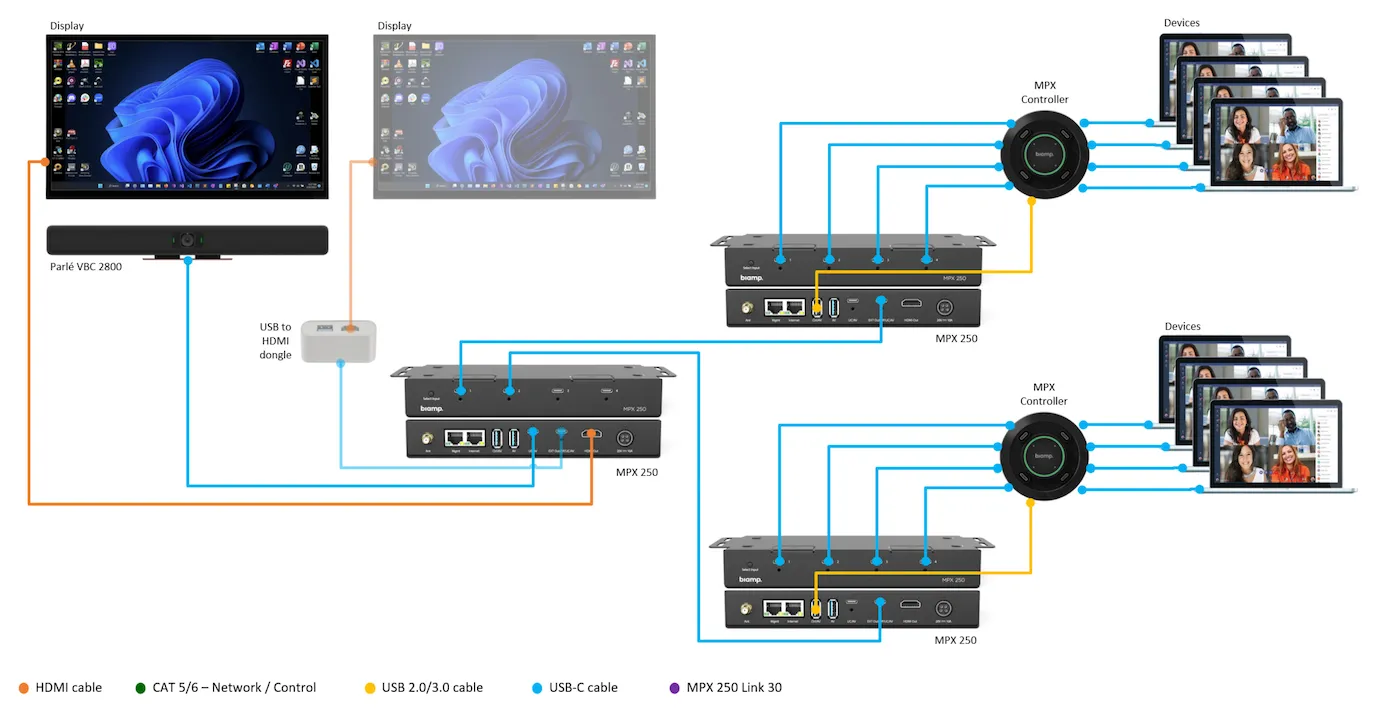
Distributed Connectivity for up to 16 Connections
An EasyConnect MPX 250 serves as a central hub for up to four additional MPX 250 units. In this configuration, all USB-C ports on the decentralized units remain available for your end devices. This means you can distribute the connections at various points in the room – ideal for large conference tables or training rooms where many users need to connect their devices at the same time. With this topology, you can seamlessly connect up to 16 end devices to the system.
Integration into Existing UC Environments
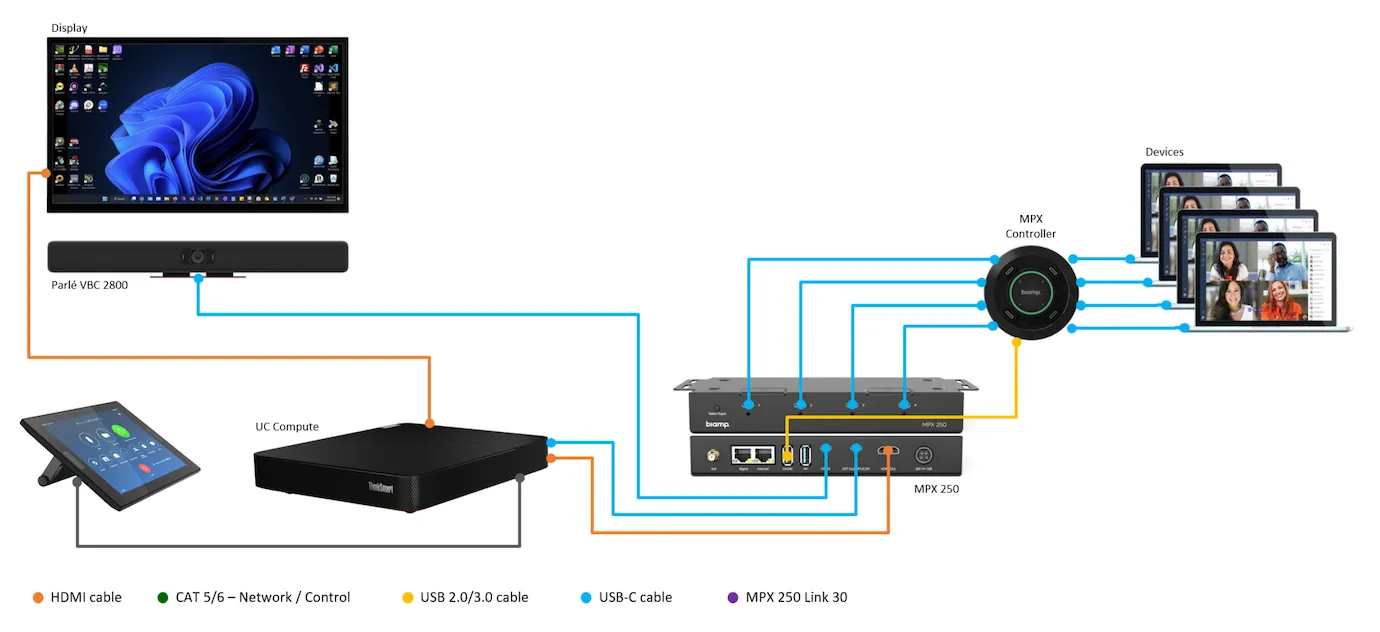
The EasyConnect MPX 250 can be seamlessly integrated into hybrid conference rooms that already have a UC system (e.g., Windows or Android).
BYOM (Bring Your Own Meeting) with UC Systems
You can configure the EasyConnect MPX 250 to act as a switching point between the permanently installed UC system and the users' laptops. With just one tap on the touch controller, you switch between the UC system and BYOM mode, ensuring smooth collaboration and maximum flexibility.
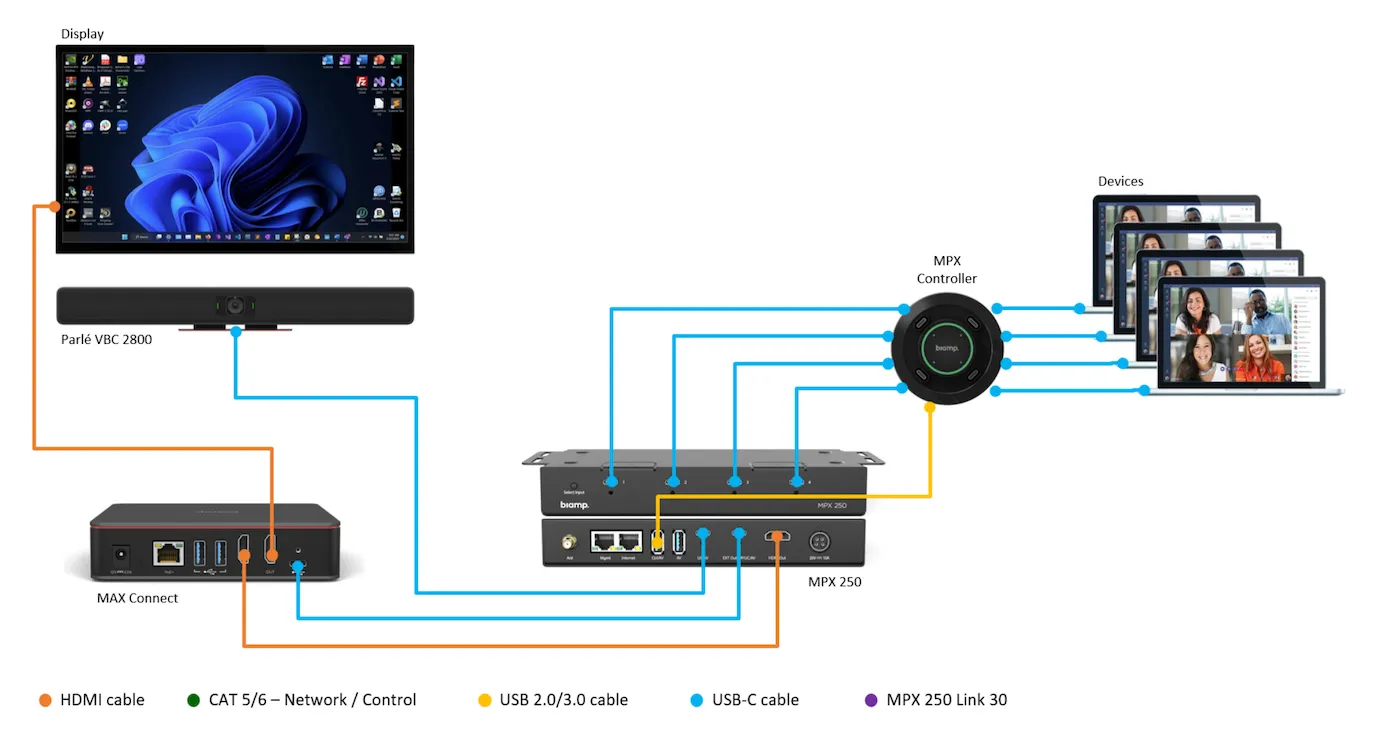
Connection with MAX Connect
In hybrid conference rooms, the EasyConnect MPX 250 can also be used in combination with a MAX Connect system to optimize the video conferencing experience and increase the flexibility of room usage.
Conclusion
The EasyConnect MPX 250 EXT 30 is the ideal solution for anyone who wants to use their EasyConnect MPX 250 system in larger rooms without having to compromise on performance. It offers a reliable, robust, and professional extension that maintains seamless connectivity. Don't wait any longer to optimize your meeting experience! Discover now how the EasyConnect MPX 250 EXT 30 makes your meeting rooms more flexible and professional. At visunext, we are happy to help you find the right AV solution
Technical data
-
General
-
Condition
-
Manufacturer
-
Brand
-
Model name
-
Product type
-
-
Dimensions and weight
-
Weight
-
Colour
-
-
Scope of delivery and warranty
-
Warranty
-
Warranty type
-
WEEE number
-
Documents & downloads
Reviews
Product safety information
Manufacturer
Biamp
EU responsible person
Biamp EuropeIndustriepark Brechtsebaan 8
2900 Schoten
Belgium
Contact
Tel.: 0032 3 448 01 60
E-Mail: BiampInfo@Biamp.Com

