
Question not listed?
We are happy to advise you – including a quote for schools, public authorities and companies.
Get advice Advice: +49 221 719981-0

 | SKU:
1000035510
SMART Board GX Plus GX186-V4-5L 86" 4K Interactive Display is always included 5.135,34 €
Together
Tax includedShipping calculated at checkout.
The items have different delivery times and will arrive in several shipments.
Questions about the product?
Whether it's a conference room, school or home cinema – Dannie Tsegai Tesfai, our Projectors and displays specialist, will advise you personally and prepare an individual quote for you.
Conference room, school or home cinema: we give you personal advice and put together a tailored quote.
Dannie Tsegai TesfaiProjectors and displaysspecialist
 | SKU:
1000035510
SMART Board GX Plus GX186-V4-5L 86" 4K Interactive Display

When modern teaching meets outdated technology, motivation and learning success often fall by the wayside. The SMART Board GX Plus is the answer to this challenge: a powerful interactive whiteboard with intuitive operation, integrated Android 14 and seamless integration of Google and Microsoft tools – specially developed for schools that want to get more out of their digital classrooms.
Teachers get a reliable, practical solution with proven SMART quality, while students are actively involved in lessons through simple operation and interactive features. Getting started with digital teaching has never been so easy – or so affordable.
The SMART Board GX Plus brings up to 50 simultaneous touch points to your classroom and, thanks to Object Awareness™, automatically recognises whether a pen is writing, a finger is moving or a palm is erasing content. This intuitive technology enables smooth, uninterrupted collaboration without teachers or students having to concentrate on the technology. The result: less distraction, more focus on learning.

Thanks to the integrated Android 14 operating system with EDLA licence, full integration with Google Workspace for Education and Microsoft 365 is open to you – without an external PC. Whether browser, whiteboard, cloud services or educational apps: the display is ready to use straight away. This lets you deliver interactive, digital lessons with the tools you know – simply, quickly and with data security.
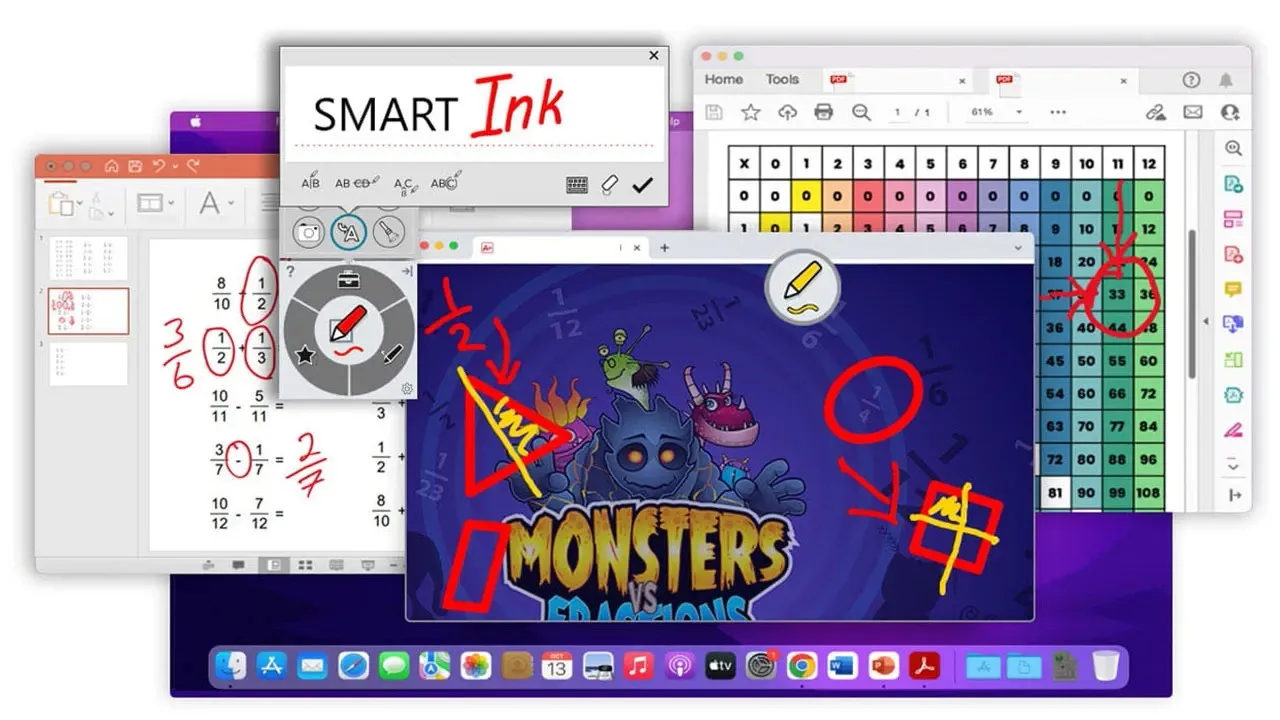
Two proven tools for digital lesson design are included: SMART Ink and SMART Notebook. With SMART Ink, you annotate content on any platform, in any window – without changing the file. SMART Notebook offers intuitive tools for interactive lessons that you can flexibly prepare, adapt and reuse. And the best part: both applications are free to use permanently – with no subscription or additional costs.
Via the front USB-C port you connect devices with just one cable – including video, audio and touch. Whether Windows, Mac or Chrome devices: cross-platform compatibility makes use straightforward for everyone involved. With SMART Mirror students share content wirelessly to the display, while teachers use touchback functions on Windows and Mac – ideal for presentations, group work and project phases.
With access to SMART Exchange®, you have an extensive online library of free teaching materials at your disposal. Here you'll find thousands of lesson plans, games and interactive activities – created by teachers for teachers. This saves you preparation time while you benefit from proven teaching concepts.
The SMART Board GX Plus is the ideal solution for schools looking for a powerful interactive display with proven technology and full software support – at a compelling price. Well-designed features, intuitive operation and high-quality software make the GX Plus a real asset for any classroom.
Answers from the user manual, the data sheet and our customers' questions. Checked on 11.11.2026.
We are happy to advise you – including a quote for schools, public authorities and companies.
Get advice Advice: +49 221 719981-0Produktdaten / Datenblatt
Produktdaten / Datenblatt
Produktdaten / Datenblatt
Manufacturer
SMART
EU responsible person
SMART Technologies (Germany) GmbHContact
E-Mail: info@germany.smarttech.com

When modern teaching meets outdated technology, motivation and learning success often fall by the wayside. The SMART Board GX Plus is the answer to this challenge: a powerful interactive whiteboard with intuitive operation, integrated Android 14 and seamless integration of Google and Microsoft tools – specially developed for schools that want to get more out of their digital classrooms.
Teachers get a reliable, practical solution with proven SMART quality, while students are actively involved in lessons through simple operation and interactive features. Getting started with digital teaching has never been so easy – or so affordable.
The SMART Board GX Plus brings up to 50 simultaneous touch points to your classroom and, thanks to Object Awareness™, automatically recognises whether a pen is writing, a finger is moving or a palm is erasing content. This intuitive technology enables smooth, uninterrupted collaboration without teachers or students having to concentrate on the technology. The result: less distraction, more focus on learning.
Thanks to the integrated Android 14 operating system with EDLA licence, full integration with Google Workspace for Education and Microsoft 365 is open to you – without an external PC. Whether browser, whiteboard, cloud services or educational apps: the display is ready to use straight away. This lets you deliver interactive, digital lessons with the tools you know – simply, quickly and with data security.
Two proven tools for digital lesson design are included: SMART Ink and SMART Notebook. With SMART Ink, you annotate content on any platform, in any window – without changing the file. SMART Notebook offers intuitive tools for interactive lessons that you can flexibly prepare, adapt and reuse. And the best part: both applications are free to use permanently – with no subscription or additional costs.
Via the front USB-C port you connect devices with just one cable – including video, audio and touch. Whether Windows, Mac or Chrome devices: cross-platform compatibility makes use straightforward for everyone involved. With SMART Mirror students share content wirelessly to the display, while teachers use touchback functions on Windows and Mac – ideal for presentations, group work and project phases.
With access to SMART Exchange®, you have an extensive online library of free teaching materials at your disposal. Here you'll find thousands of lesson plans, games and interactive activities – created by teachers for teachers. This saves you preparation time while you benefit from proven teaching concepts.
The SMART Board GX Plus is the ideal solution for schools looking for a powerful interactive display with proven technology and full software support – at a compelling price. Well-designed features, intuitive operation and high-quality software make the GX Plus a real asset for any classroom.
